 Chatshelf
Folders, search and export for your ChatGPT, Claude and Gemini chats
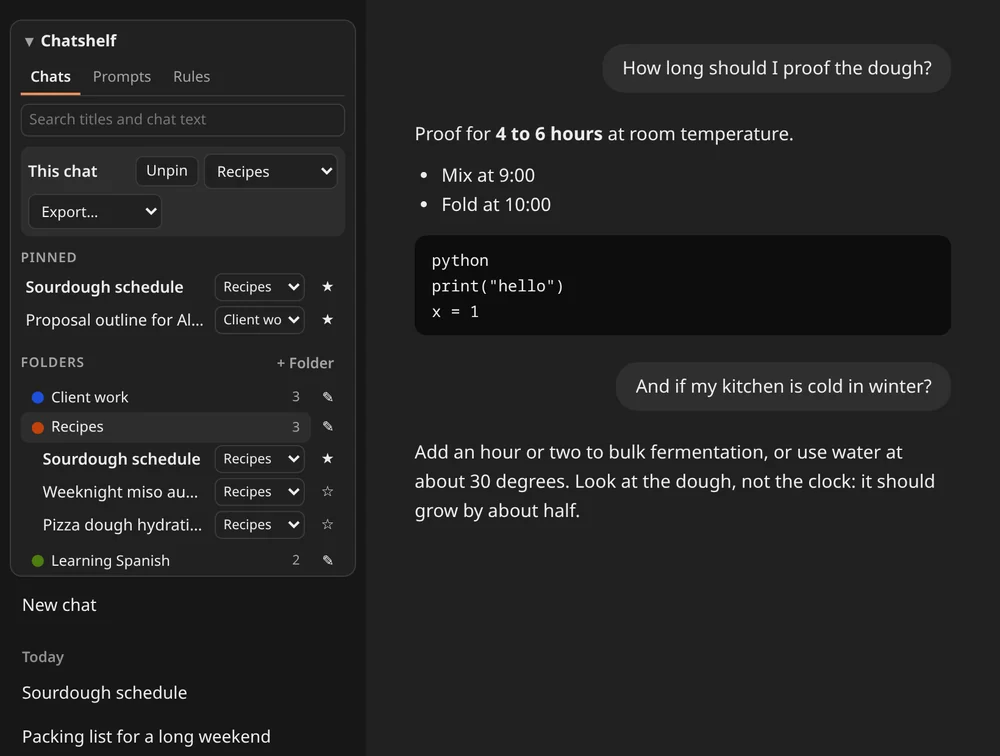
Chatshelf adds folders, pins and search next to the chat list on ChatGPT, Claude and Gemini, and exports a conversation as Markdown. Your folders and pins are stored in your browser, with no account.
For Microsoft Edge and Firefox on desktop. No account. Updated 2026-10-03.
A long chat history is one flat list
ChatGPT, Claude and Gemini list your chats in the order you used them. After a few months, finding the one with the answer means scrolling and guessing at titles.
- A chat has no place to live. Work, study and side projects sit in the same list.
- Each site shows only its own chats, so a question you asked on one assistant is invisible from another.
- Titles are made up by the site, so they often do not say what the chat was for.
Chatshelf reads the page you have open. It does not call any site's internal API, and it never deletes or changes your chats. A chat appears in search once the site has listed it in its sidebar.
What free does
The free version is a working filing system for your chats, with no account and no card.
- Up to 8 folders, each with a name and a colour, and one level of subfolders. Drag a chat from the site's own list onto a folder, or use the Move to menu
- Pinned chats at the top of the section
- Search by title across every chat the extension has seen in the sidebar, and inside the text of your 20 most recent chats, on all three sites, also from the popup
- Export the open chat as Markdown or JSON, with code blocks kept
- 5 saved prompts that insert into the site's message box
- Backup and restore of your folders, pins, rules and prompts as one JSON file
- The section follows the site's light or dark theme. If a site changes its layout and the chat list cannot be found, a small Chatshelf button appears in the corner instead
- Your folders, pins and saved chat text stay in the browser. Chatshelf has no server that holds them
Pro lifts the limits and adds auto-file rules, search of every saved chat, and zip and PDF export. See pricing.
Pricing
Free covers up to 8 folders, pins, search, Markdown and JSON export of the open chat, 5 saved prompts and backup. Pro removes the limits, adds auto-file rules, searches every saved chat, exports a folder or all chats as a zip and a page for PDF, and costs €29 for a year or €49 once.
| Feature | Free | Pro |
|---|---|---|
| Pins, drag and drop, popup search, backup and restore | Included | Included |
| Folders | 8 | Unlimited |
| Search | Chat titles, and the text of your 20 most recent chats | Titles, and the text of every saved chat |
| Export the open chat | Markdown and JSON | Markdown, JSON and a print-ready page for PDF |
| Export a folder or every saved chat as a zip, or all chats as one Markdown file | Not included | Included |
| Auto-file rules that sort new chats into folders by title or site | Not included | Included |
| Saved prompts that insert into the message box | 5 | Unlimited |
| Backup file | Folders, pins, rules and prompts | Also holds the saved chat text |
| Browsers per licence | Not applicable | Up to 3 |
| Price |
€0 forever No account, no card Add to Edge Add to Firefox |
€29 for a year or €49 once, for a lifetime pass. One-time payments, nothing renews. Get Pro, 1 year, €29 Lifetime pass, €49 |
New installs get 7 days of Pro, free, with no card. After that Chatshelf stays free unless you buy a pass, and what you saved stays. Pro is not a subscription. How buying works.
Questions
- How do I put ChatGPT chats in folders?
- Install Chatshelf. A section appears above your chat list on chatgpt.com. Make a folder, then drag a chat onto it or choose it from the Move to menu. The same works on Claude and Gemini.
- Can I export a ChatGPT conversation?
- Yes. Open the chat, choose Export in the Chatshelf section and pick Markdown or JSON, both free. Pro adds a print-ready page you can save as PDF, and a zip of a folder or of all your saved chats.
- Can I export a Gemini chat to PDF?
- Yes, with Pro. Open the Gemini chat, choose Export, then Print-ready HTML, and use your browser's Print, Save as PDF. Markdown and JSON export of the open chat are free.
- Does it work with Claude and Gemini as well as ChatGPT?
- Yes. Folders, pins, search and export work on chatgpt.com, claude.ai and gemini.google.com, and one search covers all three.
- Is Chatshelf free?
- Yes. Free keeps up to 8 folders, pins, search, Markdown and JSON export of the open chat, 5 saved prompts, and backup and restore. Pro removes the limits and adds auto-file rules, search of every saved chat and zip export.
- Does Chatshelf read my chats?
- It reads the chat list the site shows and the chat you have open, and saves the text on your computer so you can search and export it. None of it is sent anywhere. Only your licence key, and a suggestion if you press Send, leave the browser.
- Why is a chat missing from search?
- A chat is listed once the site shows it in its sidebar, and its text is saved when you open it. Free searches the text of your 20 most recent saved chats and every title.
- Is Pro a subscription?
- No. Pro is €29 for a year or €49 once for a lifetime pass, and nothing renews. One licence works on up to 3 browsers.
- How do I activate Pro?
- Pay on Payhip, copy the licence key from the receipt or the email, open the Chatshelf popup, choose Upgrade and paste the key.
- Where do I get help?
- Use the contact form on the seller page.
Missing something? Tell us what Chatshelf should do next on the roadmap page.